Tutorial 0) Arbok, a dynamicially generated qcodes driver
0.1 Introduction and overwiew
Welcome to the arbok_driver tutorials!
In this series we will explore how this python package generates a qcodes driver on the fly to modularize and parameterize our complex measurement sequences.
Arbok is a top-level python control framework based on QCoDeS compiling into FPGA instructions (QM-QUA SDK) for quantum machines hardware. The core idea behind arbok is to write qubit control sequences in a device and measurement setup agnostic manner that are configured/ scaled to larger systems by providing the respective configurations that characterize that given system.
Tutorial 0 briefly introduces arbok and its main user facing classes:
ArbokDriver:The qcodes instrument managing the hardware connection to the OPXMeasurement:The drivers instrument-module(s) orchestrating measurementsSubSequence:The modular building blocks populating measurements with instructions (qua)Device:Manages device specific configurations
QCoDeS is a full stack data acquisition framework that handles instrument communication, parameterization, data storage and visualization. For now we will not dive into the scalability and features of arbok but will try to understand its connection to QCoDeS and how it leverages its well tested, excellent infrastructure.
The following tutorials will give insights into the following topics:
Tutorial 1) – Scale up and parameterization
Tutorial 2) – Readout and live data processing
Tutorial 3) – Live input streaming of parameters
Tutorial 4) – Asynchronous operations
0.2 Generating a dynamic arbok_driver
To get started, lets create a simple ArbokDriver instance and a Device.
The driver itself needs nothing but a name and a device.
The device on the other hand requires a opx hardware configuration as well as
a dict specifying the voltage dividers between the OPX and your physical device.
Firstly, let’s import a few helpers to display external code and the files we are creating.
import inspect
from IPython.display import Code, display, display_html, Image, SVG
0.2.1 Creating a Device and ArbokDriver instance
from arbok_driver import ArbokDriver, Device, Measurement

from configurations.opx_config import opx_config
from configurations.divider_config import divider_config
2025-09-03 15:16:33,950 - qm - INFO - Starting session: e1b1508a-f2ef-45ad-8814-9b985acc4072
mock_device = Device(
    name = 'mock_device',
    opx_config = opx_config,
    divider_config = divider_config)

mock_driver = ArbokDriver(
    name = 'mock_driver',
    device = mock_device
)
0.2.2 Adding a Measurement to the driver
Let’s look back on what we did so far! We created a Device object that holds the configuration for the OPX as well as a configuration describing the installed dividers on our lines.
That device is then used to create an ArbokDriver instance. So far so good but now we want to create some actual measurements.
mock_measurement = Measurement(
    parent = mock_driver,
    name = "mock_measurement"
)
0.2.3 Populating the Measurement with a SubSequence
The fundamental building blocks of arbok are called SubSequences. Those can be arbitrarily simple or complicated.
Below we are inspecting an easy SquarePulse class inheriting from SubSequence. An element is ramped to a certain amplitude, a wait time is being passed and finally the element is ramped back to its inital voltage. This is assuming the given element is ‘sticky’.
You already see that some of the attributes are being called with brackets e.g self.element(), self.ramp_time(), etc. Those will become important in a bit!
from example_sequences.square_pulse import SquarePulse
from configurations.square_pulse_config import square_pulse_config

display(Code(inspect.getsource(SquarePulse), language="python"))
class SquarePulse(SubSequence):
    """
    Class containing parameters and sequence for a simple square pulse
    """

    def qua_sequence(self):
        """Macro that will be played within the qua.program() context"""
        qua.align()
        qua.play('ramp'*qua.amp(self.amplitude()), self.element(), duration = self.t_ramp())
        qua.wait(self.t_square_pulse(), self.element())
        qua.play('ramp'*qua.amp(-self.amplitude()), self.element(), duration = self.t_ramp())
In order to populate a measurement with sub-sequences, we have to create a dict reflecting the structure of our measurement. Here we are just considering a single SubSequence in the form of a SquarePulse. It is parameterized by a configuration. We will ignore this part for now and will go in depth in tutorial 1.
sub_sequence_dict = {
    'square_pulse': {
        'sequence': SquarePulse,
        'config': square_pulse_config
    }
}

mock_measurement.add_subsequences_from_dict(sub_sequence_dict)
The current structure is visualized by the figure below. We created an arbok_driver instance and added a measurement to it. This empty measurement was populated with a SquarePulse SubSequence.
The ArbokDriver inherits from qcodes.Instrument and each box in the figure is a qcodes.InstrumentModule of the box that contains it.
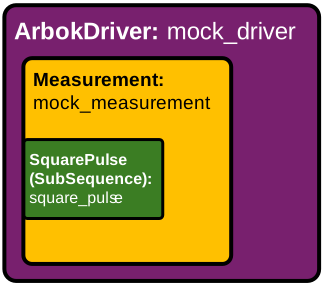
If you want to check the resulting structure of your measurement you can either list its sub_sequences or you draw the sub_sequence tree. Since the arbok_driver is based on QCoDeS, we can use all their helper functions as well to inspect our dynamicaly created instrument. As you see below, so far our driver has one measurement which is implemented as an InstrumentModule which has a sub-module (SquarePulse) itself. print_readable_snapshot also lists all available parameters and their current values.
mock_measurement.sub_sequences
[<SquarePulse: mock_driver_mock_measurement_square_pulse of Measurement: mock_driver_mock_measurement>]
mock_measurement.draw_sub_sequence_tree()
mock_measurement
 └─ square_pulse
mock_driver.submodules
{'mock_driver_mock_measurement': <Measurement: mock_driver_mock_measurement of ArbokDriver: mock_driver>}
mock_driver.print_readable_snapshot()
mock_driver:
	parameter value
--------------------------------------------------------------------------------
IDN       :	None
iteration :	None
mock_driver_mock_measurement:
	parameter value
--------------------------------------------------------------------------------
mock_driver_mock_measurement_square_pulse:
	parameter     value
--------------------------------------------------------------------------------
amplitude      :	0.1 (V)
element        :	gate_1 (N/A)
t_ramp         :	200 (s)
t_square_pulse :	100 (s)
0.3 Generating a qua program to run
As soon as we have populated a Measurment, we can generate a qua program. Lets do that, save it to a file and discuss what we are seeing.
Looks familiar, right? I’m sure you are recognizing the square pulse we inspected earlier.
You see that all the parameters were converted to the values we observed in the snapshot.
However, we see a bit more than we expected! The entire code is nested in an infinite_loop starting with a pause statement. This will become important in the next part in order to synchronize the running program with the driver running on your local machine. The same is true for the stream_processing section in the bottom.
qua_program = mock_measurement.get_qua_program()
mock_driver.print_qua_program_to_file(
    './qua_programs/single_square_program.py', qua_program)

from qua_programs import single_square_program

display(Code(inspect.getsource(single_square_program), language="python"))
# Single QUA script generated at 2025-09-03 16:51:02.305902
# QUA library version: 1.2.1

from qm import CompilerOptionArguments
from qm.qua import *

with program() as prog:
    v1 = declare(int, value=0)
    with infinite_loop_():
        pause()
        assign(v1, 0)
        align()
        play("ramp"*amp(0.1), "gate_1", duration=200)
        wait(100, "gate_1")
        play("ramp"*amp(-0.1), "gate_1", duration=200)
        align()
        assign(v1, (v1+1))
        r0 = declare_stream()
        save(v1, r0)
        align()
    with stream_processing():
        r0.buffer(1).save("mock_driver_mock_measurement_shots")


config = None

loaded_config = None
0.4 Summary
In this tutorial, we introduced the core concepts and workflow of the arbok_driver package. We demonstrated how to set up a mock device and driver using configuration files, and how to add a measurement to the driver. We explored the modular structure of measurements by adding a simple SquarePulse sub-sequence, and visualized the resulting instrument hierarchy. Finally, we generated a QUA program from the configured measurement, showing how the high-level abstractions in arbok_driver translate into executable code for quantum hardware. This foundation prepares us for more advanced topics in subsequent tutorials, such as scaling up measurements, data readout and processing as well as asynchronous operations like feedback or heraled operations.
Continue with tutorial 1